PizzaBoy Getting Started
Install the demo, learn the controls, and survive your first monster delivery.
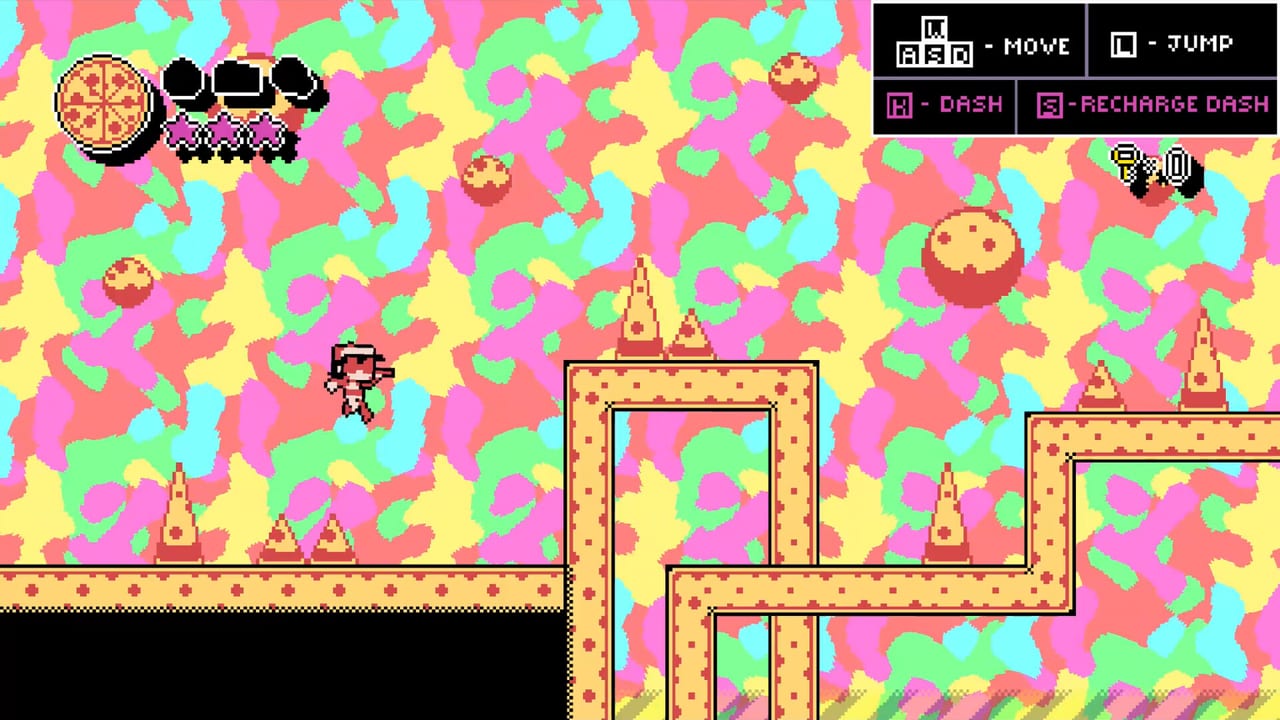
PizzaBoy looks like a joke about pizza delivery until the first gap asks you to air dash, recharge mid-route, and leave a monster untouched because one touch can ruin the order. This Getting Started guide is the calm onboarding page for new Steam players: what the game is, how to install the demo, how the controls work, and what to practice before you chase secrets or alternate endings.
PizzaBoy is developed by Breadless and is planned to launch on Steam on August 14, 2026. It is a single-player precision platformer with Metroidvania-style maps, full controller support, and English as the current storefront language focus. Windows and Linux are the supported PC platforms called out for this release window. A demo is available now, so you do not need to wait for launch day to learn the move set.
You play as PizzaBoy, a delivery worker promoted into monster territory for Pizza Dawg’s Pizza. Along the way you meet strange faces such as VampireGirl and Pepperoni Dog. The comedy is loud, but the rules are strict: PizzaBoy cannot fight. If monsters get close, they steal pizza. Customers do not celebrate a half-eaten box. That single rule changes how you read every room.
For a map of every tutorial on the wiki, return to the PizzaBoy Guides Hub. When you are ready for a full demo route with endings, open the PizzaBoy Demo Walkthrough.
Install the demo the smart way
- Open the PizzaBoy Steam page and wishlist the full game so launch reminders stay visible.
- Install the free demo while you still have an evening free for practice.
- Confirm keyboard or controller before the first run. Full controller support is available; keyboard defaults are listed below.
- Play the first chapter once for orientation, then replay with a goal: clean pizza, secret hunt, or ending branch.
Do not treat the demo as disposable filler. The demo teaches the same fantasy the full game expands: deliver, explore, remember, and decide how much of Pizza Dawg’s Pizza you want to understand.
PizzaBoy controls (keyboard defaults)
These defaults come from the real demo control sheet used in verified walkthrough footage:
| Action | Keys |
|---|---|
| Move | WASD or Arrow Keys |
| Jump | L, Z, or Space |
| Dash | K, X, or Shift |
| Recharge Dash | S or Down |
| Interact | W or Up |
Controller users should bind an equivalent layout that keeps jump, dash, and recharge on fast fingers. Recharge is not a minor button. In PizzaBoy, dash recharge is part of traversal grammar, not a panic heal. If you only mash dash without recharging on purpose, long rooms will strand you midair.
After you can move without looking at the keyboard, graduate to the Air Dash Movement Guide. That page is where jump chains, wall bounces, and recharge timing become intentional.
First-hour checklist
Use this list on your first clean session:
- Complete the tutorial spaces until jump, dash, and recharge feel automatic.
- Deliver one pizza on the obvious main path without hunting every side room.
- Replay the same stretch and practice avoiding monsters instead of brushing past them.
- On a third pass, leave the road and poke one suspicious wall, ledge, or interact prompt.
- Note whether your chapter ending feels different when you explore more. Then read the Multiple Endings Guide.
This progression stops the common beginner mistake: trying to 100% the map while still dropping pizza to the first patrol.
Understand the pizza fantasy before the skill ceiling
PizzaBoy is not a beat-em-up with a pizza skin. The fantasy is courier pressure. Every monster is a theft risk. Every detour is a story risk and a reward risk. The company name Pizza Dawg’s Pizza is not just flavor text; chapter exploration can reveal darker company secrets and lost memories about who PizzaBoy really is. If that sentence already interests you, bookmark the Secrets and Collectibles Guide after your first clear.
If your early deaths are mostly contact losses, skip ahead to the Protect Pizza Delivery Guide. Learning when to wait one beat is more valuable than learning a flashy diagonal dash you cannot recover from.
Common beginner mistakes
- Treating enemies like targets. There is no fight button that solves a packed hallway.
- Saving dash for emergencies, then discovering emergencies require a charged dash you never recharged.
- Exploring every optional room on attempt one, then raging when a late monster steals the order.
- Ignoring Interact on W or Up and missing story objects that change chapter tone.
- Assuming the demo endings are random. They track how you play the chapter.
When a single screen still feels unfair after ten tries, open the Tough Sections Guide instead of restarting the whole chapter on autopilot.
What to practice before August 14, 2026
Launch day will be louder. The players who already own the demo muscle memory will spend their first full-game hour reading story and routes instead of relearning S-to-recharge. Focus practice on:
- Short hop into dash into recharge on a safe ledge.
- Wall bounce lines that never skim monster hurtboxes.
- Interact checks whenever a room feels too empty.
- One intentional ending run that ignores optional content, then one that hunts it.
Where to go next
- Demo structure and endings video: How to Play the PizzaBoy Demo
- Movement lab: Air Dash Movement Guide
- Survival lab: Protect Pizza Delivery Guide
- Optional content: Secrets and Collectibles Guide
- Outcome logic: Multiple Endings Guide
- Stuck rooms: Tough Sections Guide
- All pages: PizzaBoy Guides Hub
PizzaBoy rewards players who respect the delivery. Start simple, keep the box whole, then let curiosity pull you off the main road.
Frequently Asked Questions
Quick answers to the most common questions.
When does PizzaBoy release?
PizzaBoy is planned for August 14, 2026 on Steam. A free demo is available now.
What are the default PizzaBoy controls?
Move with WASD or arrows, jump with L/Z/Space, dash with K/X/Shift, recharge dash with S/Down, and interact with W/Up. Controllers are fully supported.
Can PizzaBoy fight monsters?
No. PizzaBoy cannot fight. Monsters steal pizza on contact, so avoidance and spacing are the real combat system.
Is PizzaBoy multiplayer?
No. PizzaBoy is a single-player game.
Which guide should I read after this?
Open the PizzaBoy Demo Walkthrough next, then the Air Dash Movement Guide once controls feel comfortable.